API Documentation using OpenAPI & Swagger
This is from a project I started to document Tenfold’s Public APIs in OpenAPI specifications. Due to some organization changes within Tenfold this project was not completed.
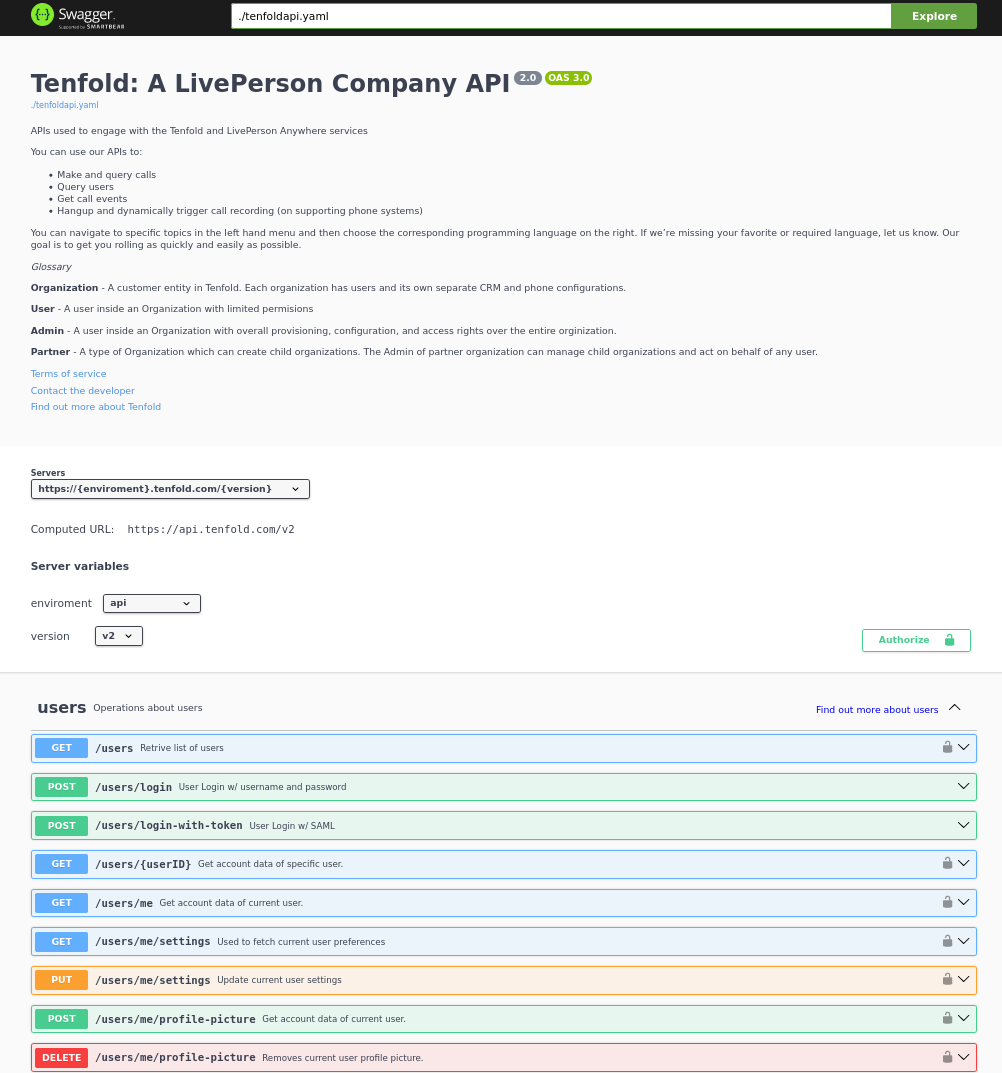
openapi: 3.0.0
info:
title: "Tenfold: A LivePerson Company API"
description: |-
APIs used to engage with the Tenfold services
You can use our APIs to:
* Make and query calls
* Query users
* Get call events
* Hangup and dynamically trigger call recording (on supporting phone systems)
You can navigate to specific topics in the left hand menu and then choose the corresponding programming language on the right. If we're missing your favorite or required language, let us know. Our goal is to get you rolling as quickly and easily as possible.
*Glossary*
**Organization** - A customer entity in Tenfold. Each organization has users and its own separate CRM and phone configurations.
**User** - A user inside an Organization with limited permisions
**Admin** - A user inside an Organization with overall provisioning, configuration, and access rights over the entire organization.
**Partner** - A type of Organization which can create child organizations. The Admin of partner organization can manage child organizations and act on behalf of any user.
version: "2.0"
termsOfService: https://tenfold.com/terms/
contact:
email: apiteam@tenfold.com
externalDocs:
description: Find out more about Tenfold
url: https://tenfold.com
servers:
- url: https://{enviroment}.tenfold.com/{version}
variables:
enviroment:
enum:
- api
- api-qa
- api-qapatch
- api-dev
default: api
version:
enum:
- v1
- v2
default: v2
tags:
- name: users
description: Operations about users
externalDocs:
description: Find out more about users
url: http://tenfold.com
- name: calls
description: Operations about call data
externalDocs:
description: Find out more about calls
url: http://tenfold.com
- name: organizations
description: Operations about orginizations
externalDocs:
description: Find out more about organizations
url: http://tenfold.com
- name: crm records
description: Operations about crm records
externalDocs:
description: Find out more about crm records
url: http://tenfold.com
- name: tracking
description: Operations about tracking
externalDocs:
description: Find out more about tracking
url: http://tenfold.com
- name: analytics
description: Operations about analytics
externalDocs:
description: Find out more about analytics
url: http://tenfold.com
- name: OAuth2
description: Operations for OAuth2
externalDocs:
description: Find out more about OAuth2
url: http://tenfold.com
paths:
# USERS
/users:
get:
tags:
- users
summary: Retrive list of users
description: Retrive list of users for given orginization
responses:
'200':
description: successful operation
content:
application/json:
schema:
$ref: '#/components/schemas/users'
security:
- bearerToken: []
/users/login:
post:
tags:
- users
summary: User Login w/ username and password
description: Used to obtain the user's data and JWT token to be used in authentication
requestBody:
required: true
content:
application/json:
schema:
type: object
properties:
username:
type: string
password:
type: string
responses:
'200': # status code
description: A JSON array containing JWT token
content:
application/json:
schema:
$ref: '#/components/schemas/login'
/users/login-with-token:
post:
tags:
- users
summary: User Login w/ SAML
description: Used to initiate OAuth login process
requestBody:
required: true
content:
application/json:
schema:
type: object
properties:
identifier:
type: string
example: orgName
loginType:
type: string
example: saml_flow
responses:
'200': # status code
description: A JSON array containing token and redirectTo
content:
application/json:
schema:
$ref: '#/components/schemas/login'
/users/{userID}:
get:
tags:
- users
summary: Get account data of specific user.
description: 'Regular users are permitted only to fetch their own account. Organization administrators can fetch data of any user in the organization.'
parameters:
- name: userID
in: path
required: true
schema:
type: string
responses:
'200':
description: successful operation
content:
application/json:
schema:
$ref: '#/components/schemas/users'
security:
- bearerToken: []
/users/me:
get:
tags:
- users
summary: Get account data of current user.
description: 'Regular users are permitted only to fetch their own account. Organization administrators can fetch data of any user in the organization.'
responses:
'200':
description: successful operation
content:
application/json:
schema:
$ref: '#/components/schemas/users'
security:
- bearerToken: []
/users/me/settings:
get:
tags:
- users
summary: Used to fetch current user preferences
description: 'Used to fetch user preferences for the current logged in user. Example: time format, timezone, primary extension, local...'
responses:
'200':
description: successful operation
content:
application/json:
schema:
$ref: '#/components/schemas/settings'
security:
- bearerToken: []
put:
tags:
- users
summary: Update current user settings
description: |-
'Update current user settings'
**primaryExtension** Primary extension of current user, as name string. Omitted from the response if not present.
**timezone** Timezone string, in format of IANA time zone database entrier. Fallback value is user's organization timezone.
**dateFormat** Date format to use, as defined by moment.js string format. Defaults to 'YYYY-MM-DD'.
**timeFormat** Time format to use, as defined by moment.js string format. Defaults to 'hh'.
**locale** User IETF language tag, as defined in BCP 47. Fallback value is user's organization locale. Note: underscores instead of dashes in locale strings are allowed and can be returned, i.e. “en_US”.
**temperatureUnit** Temperature unit to use, one of “celsius” or “fahrenheit”. Defaults to “celsius”.
requestBody:
required: false
content:
application/json:
schema:
type: object
properties:
primaryExtension:
type: string
example: abcdef
timezone:
type: string
example: US/Central
dateFormat:
type: string
example: YYYY-MM-DD
timeFormat:
type: string
example: hh
locale:
type: string
example: en-US
temperatureUnit:
type: string
example: celsius
responses:
'200':
description: Setting successfuly updated
content:
application/json:
schema:
$ref: '#/components/schemas/settings'
security:
- bearerToken: []
/users/me/profile-picture:
post:
tags:
- users
summary: Get account data of current user.
description: Sets new user profile picture. Profile picture must be smaller than 2MB and be either JPEG or PNG image.
requestBody:
required: false
content:
multipart/form-data:
schema:
properties:
image:
type: string
format: binary
example: FILENAME.jpg
responses:
'200':
description: successful operation
content:
application/json:
schema:
type: object
properties:
url:
type: string
example: https://.../FILENAME.jpg
security:
- bearerToken: []
delete:
tags:
- users
summary: Removes current user profile picture.
description: Removes current user profile picture.
responses:
'200':
description: successful operation
security:
- bearerToken: []
# CALLS
/calls:
get:
tags:
- calls
summary: Get list of calls
description: |-
Fetch list of calls for current logged in user
parameters:
- name: crmRecordId
in: query
required: false
description: Related CRM record ID to filter calls by
schema:
type: string
- name: userId
in: query
required: false
description: Return only calls of specified user
schema:
type: string
responses:
'200':
description: successful operation
content:
application/json:
schema:
$ref: '#/components/schemas/calls'
security:
- bearerToken: []
/calls/{CALL_ID}:
get:
tags:
- calls
summary: Returns the call object referenced by CALL_ID
description: Returns the call object referenced by CALL_ID
parameters:
- name: CALL_ID
in: path
required: true
schema:
type: string
responses:
'200':
description: successful operation
content:
application/json:
schema:
$ref: '#/components/schemas/calls'
security:
- bearerToken: []
put:
tags:
- calls
summary: Updates the call referenced by CALL_ID
description: Updates the call referenced by CALL_ID
parameters:
- name: CALL_ID
in: path
required: true
schema:
type: string
requestBody:
required: true
content:
application/json:
schema:
type: object
properties:
crmRecordId:
type: string
example: 12345678-1234-1234-1234-1234567890ab
description:
type: string
example: Sample Notes
subject:
type: string
example: Note Title
responses:
'200':
description: successful operation
content:
application/json:
schema:
$ref: '#/components/schemas/calls'
security:
- bearerToken: []
/calls/{CALL_ID}/set-matching-record :
put:
tags:
- calls
summary: Set the matched record to a call
description: Sets the record identified by recordId and module as the matched record for the call identified by CALL_ID. This endpoint is useful for solving no-matches and multi-matches scenarios
parameters:
- name: CALL_ID
in: path
required: true
schema:
type: string
requestBody:
required: true
content:
application/json:
schema:
type: object
properties:
recordId:
type: string
example: 1234ABCDEF
module:
type: string
example: Contact
responses:
'200':
description: successful operation
content:
application/json:
schema:
$ref: '#/components/schemas/calls'
security:
- bearerToken: []
/calls/{CALL_ID}/transfer-history:
get:
tags:
- calls
summary: Get history of transfers for a given call.
description: Get history of transfers for a given call.
parameters:
- name: CALL_ID
in: path
required: true
schema:
type: string
responses:
'200':
description: successful operation
content:
application/json:
schema:
$ref: '#/components/schemas/transferHistory'
security:
- bearerToken: []
# ORGINIZATIONS
/organizations/{organizationID}:
get:
tags:
- organizations
summary: Get data of specified organization.
description: Get data of specified organization. Only data of current user's organization can be fetched.
parameters:
- name: organizationID
in: path
required: true
schema:
type: string
responses:
'200':
description: successful operation
content:
application/json:
schema:
$ref: '#/components/schemas/organizations'
security:
- bearerToken: []
/organizations/health-check:
get:
tags:
- organizations
summary: Integration health check for organization
description: |-
Perform integrations health check for current user's organization.
CRM and Phone System integration health check results are returned. One or both of the results can be omitted from the response, if configuration for them is not present at all.
responses:
'200':
description: successful operation
content:
application/json:
schema:
$ref: '#/components/schemas/healthCheck'
example: {"data": [{"type": "crm", "name": "salesforce", "status": "connected"}, {"type": "phone", "name": "tcc", "status": "disconnected"}]}
security:
- bearerToken: []
# CRM RECORDS
/crm/records :
post:
tags:
- crm records
summary: Create new CRM record for specified form.
description: Create new CRM record for specified form.
requestBody:
required: true
content:
application/json:
schema:
type: object
properties:
formId:
type: string
example: 1234ABCDEF
fields:
type: object
example: key1:value1, key2:value2
responses:
'200':
description: successful operation
content:
application/json:
schema:
$ref: '#/components/schemas/crmRecords'
security:
- bearerToken: []
/crm/records/{RECORD_ID}:
put:
tags:
- crm records
summary: Edit existing CRM record for specified form.
description: Edit existing CRM record for specified form.
parameters:
- name: RECORD_ID
in: path
required: true
schema:
type: string
requestBody:
required: true
content:
application/json:
schema:
type: object
properties:
formId:
type: string
example: 1234ABCDEF
update:
type: object
example: key1:value1, key2:value2
responses:
'200':
description: successful operation
content:
application/json:
schema:
$ref: '#/components/schemas/crmRecords'
security:
- bearerToken: []
/crm/records/{RECORD_ID}/remove-number:
delete:
tags:
- crm records
summary: Remove number from CRM record
description: Remove specified phone number from CRM record. If call ID is supplied, remove phone number also from specified call.
parameters:
- name: RECORD_ID
in: path
required: true
schema:
type: string
requestBody:
required: true
content:
application/json:
schema:
type: object
properties:
number:
type: string
example: '123123123'
callId:
type: string
example: CALL_ID
module:
type: string
example: Leads
responses:
'200':
description: successful operation
security:
- bearerToken: []
/crm/records/{RECORD_ID}/last-interaction:
get:
tags:
- crm records
summary: Get last interaction with specified CRM record ID.
description: Get last interaction with specified CRM record ID.
parameters:
- name: RECORD_ID
in: path
required: true
schema:
type: string
- name: module
in: query
required: true
schema:
type: string
responses:
'200':
description: successful operation
content:
application/json:
schema:
$ref: '#/components/schemas/lastInteraction'
security:
- bearerToken: []
/crm/records/{RECORD_ID}/active-interaction:
get:
tags:
- crm records
summary: Get active interaction
description: This endpoint fetches the most recent interaction made on the current day for a record identified by RECORD_ID. It differs from the last-interaction endpoint in the sense that this one includes interactions that might still be happening.
parameters:
- name: RECORD_ID
in: path
required: true
schema:
type: string
- name: module
in: query
required: true
schema:
type: string
responses:
'200':
description: successful operation
content:
application/json:
schema:
$ref: '#/components/schemas/activeInteraction'
security:
- bearerToken: []
# TRACKING
/tracking:
post:
tags:
- tracking
summary: Track event using integration set for current user account.
description: Track event using integration set for current user account.
requestBody:
required: true
content:
application/json:
schema:
type: object
properties:
event:
type: string
example: name_of_event_to_track
data:
type: object
properties:
event_property_1:
type: string
example: event_value_1
event_property_2:
type: string
example: event_value_2'
responses:
'200':
description: successful operation
security:
- bearerToken: []
# ANALYTICS
/analytics/search:
get:
tags:
- analytics
summary: Search for calls
description: Search for calls based on search query, consisting of space-separated words or expressions (double-quoted strings). Organization administrators can see all calls in the organization. Other users can see calls made by users belonging to one of teams visible by them. See [analytics permissions](https://apidocs.tenfold.com/#analytics-permissions) for more information about team visibility.
parameters:
- name: q
in: query
required: false
description: |-
Query string to filter returned calls by. In format of space-separated expressions, with parts surrounded by double-quotes understood as single expression (even when containing spaces).
Example: ?q=word1 word2 "expression 1" word3 "expression two".
schema:
type: string
responses:
'200':
description: successful operation
content:
application/json:
schema:
$ref: '#/components/schemas/calls'
security:
- bearerToken: []
/analytics/users/{USER_ID}/calls:
get:
tags:
- analytics
summary: Get calls for user
description: Organization administrators can see calls of any user in the organization. Other users can see only their own calls. See [analytics permissions](https://apidocs.tenfold.com/#analytics-permissions) for more information about analytics permissions.
parameters:
- name: USER_ID
in: path
required: true
schema:
type: string
responses:
'200':
description: successful operation
content:
application/json:
schema:
$ref: '#/components/schemas/calls'
security:
- bearerToken: []
/analytics/calls/{call_ID}/transcript:
get:
tags:
- analytics
summary: Get transcript for given call.
description: Get transcript for given call.
parameters:
- name: call_ID
in: path
required: true
schema:
type: string
responses:
'200':
description: successful operation
content:
application/json:
schema:
$ref: '#/components/schemas/transcript'
security:
- bearerToken: []
/analytics/calls/{call_ID}/keywords:
get:
tags:
- analytics
summary: Get keywords for call
description: Get keywords instance for given call.
parameters:
- name: call_ID
in: path
required: true
schema:
type: string
responses:
'200':
description: successful operation
content:
application/json:
schema:
$ref: '#/components/schemas/keywords'
security:
- bearerToken: []
# OAUTH2
/oauth/authorize:
put:
tags:
- OAuth2
summary: Server-side apps authorization
description: Server-side apps authorization
requestBody:
required: true
content:
application/json:
schema:
type: object
properties:
response_type:
type: string
example: code
redirect_uri:
type: string
example: https://.../
client_id:
type: string
example: a4cff2d5d132c3914395b3a
allow:
type: string
example: yes
responses:
'302':
description: The above request returns 302 Found response with Location header containing redirect URI with authorization code added as query parameter
content:
application/json:
schema:
$ref: '#/components/schemas/token'
/oauth/token:
put:
tags:
- OAuth2
summary: Granting authorization token using authorization code
description: Granting authorization token using authorization code using authorization code or previously obtained refresh token. See the Request Body Schema
requestBody:
required: true
content:
application/json:
schema:
oneOf:
- $ref: '#/components/schemas/authorizationCode'
- $ref: '#/components/schemas/refreshToken'
responses:
'200':
description: successful operation
content:
application/json:
schema:
$ref: '#/components/schemas/token'
# COMPONETS
components:
schemas:
calls:
type: object
properties:
data:
type: array
items:
$ref: '#/components/schemas/callsData'
users:
type: object
properties:
data:
type: array
items:
$ref: '#/components/schemas/usersData'
organizations:
type: object
properties:
data:
type: array
items:
$ref: '#/components/schemas/organizationsData'
settings:
type: object
properties:
settings:
type: array
items:
$ref: '#/components/schemas/settingsData'
transferHistory:
type: object
properties:
data:
type: array
items:
$ref: '#/components/schemas/transferHistoryData'
crmRecords:
type: object
properties:
data:
type: object
properties:
record:
$ref: '#/components/schemas/crmRecordsData'
lastInteraction:
type: object
properties:
data:
$ref: '#/components/schemas/lastInteractionData'
activeInteraction:
type: object
properties:
data:
$ref: '#/components/schemas/callsData'
transcript:
type: object
properties:
data:
$ref: '#/components/schemas/transcriptData'
keywords:
type: object
properties:
data:
$ref: '#/components/schemas/keywordsData'
token:
type: object
properties:
token_type:
type: string
example: bearer
access_token:
type: string
example: 855c4ae7365709415373413538acadd37d9457df
expires_in:
type: string
example: '3600'
refresh_token:
type: string
example: 21a662fbf794057c77032ae1f12ae523dcc31fea
login:
type: object
properties:
accessToken:
type: string
example: OUEHV97RH34GHwefew937GF3OGJ34rvw0GH934HG93g4H934H
data:
type: object
$ref: '#/components/schemas/loginData'
agentStatus:
type: string
example: null
createdA:
type: string
example: 2021-12-15T14:41:15.833Z
crmId:
type: string
example: w937GF3OGJ34rvw0GH
crmUser:
type: string
example: someone@email.com
did:
type: object
properties:
number:
type: string
example:
verified:
type: boolean
example: true
extension:
type: array
items:
type: string
example:
- '1004'
- '3213'
id:
type: string
example: pefuuvr9eivpoev989n
inboundEnabled:
type: boolean
example: true
isAdmin:
type: boolean
example: false
name:
type: string
example: User Name
organizationId:
type: string
example: ph2349238y72398eij08rju0
passwordChangeRequired:
type: boolean
example: false
phoneNumbers:
type: array
items:
type: string
example:
- 555-555-1234
- 555-444-7777
pictureUrl:
type: string
example: https://tenfold-user-profile-pictures.s3.amazonaws.com/4478gf83g.jpg"
teams:
type: array
items:
type: string
example:
- team1
- team2
username:
type: string
example: someone@email.com
ctdOptions:
type: object
$ref: '#/components/schemas/ctdOptions'
isSoftphone:
type: boolean
example: false
localOptions:
type: string
example: null
softphone:
type: string
example:
healthCheck:
type: object
properties:
data:
$ref: '#/components/schemas/healthCheckData'
healthCheckData:
type: array
items:
$ref: '#/components/schemas/intergrationData'
intergrationData:
type: object
properties:
type:
type: string
example: crm
name:
type: string
example: salesforce
status:
type: string
example: connected
loginData:
type: object
properties:
agentPreferredExtension:
type: string
example: '1004'
agentSession:
type: object
properties:
status:
type: string
example: inactive
agentId:
type: string
example: '353423534'
extension:
type: string
example: '1004'
crmRecordsData:
type: object
properties:
bean_id:
type: string
example: 12345678-1234-1234-1234-1234567890ab
bean_name:
type: string
example: John Doe
bean_edit_link:
type: string
example: http://demo.callinize.com/index.php?module=Leads&action=EditView&record=12345678-1234-1234-1234-1234567890ab
bean_link:
type: string
example: http://demo.callinize.com/index.php?module=Leads&action=DetailView&record=12345678-1234-1234-1234-1234567890ab
bean_module:
type: string
example: Leads
location:
type: object
properties:
location:
type: string
example: https://.../?code=AUTHORIZATION_CODE
usersData:
type: object
properties:
id:
type: string
example: 5a4656511b43af426a897031
organizationId:
type: string
example: 5ab354121b4aaf3f6a817031
primaryTeamId:
type: string
example: 5ab354121b4aaf3f6a817031
username:
type: string
example: john.doe@tenfold.com
name:
type: string
example: John Doe
pictureUrl:
type: string
example: https://....png
inboundEnabled:
type: boolean
example: true
extensions:
type: array
items:
type: string
example:
- extension1
- extension2
did:
type: boolean
example: true
createdAt:
type: string
example: 1970-02-24T14:50:57.603Z
isAdmin:
type: boolean
example: false
agentStatus:
type: string
phoneNumbers:
type: object
settingsData:
type: object
properties:
primaryExtension:
type: string
example: "abcdef"
timezone:
type: string
example: "US/Central"
dateFormat:
type: string
example: "YYYY-MM-DD"
timeFormat:
type: string
example: "hh"
locale:
type: string
example: "en-US"
temperatureUnit:
type: string
example: "celsius"
defaultOutboundSkill:
type: string
example: outbound124
dateTimeFormat:
type: string
example: hh
organizationsData:
type: object
properties:
id:
type: string
example: 5a65d64679ee1d8f4761bddf
company:
type: string
example: Example Organization
abbr:
type: string
example: EXAMPLE_ORG
status:
type: string
example: Active
adminId:
type: string
example: a65d64679ee1d8f4761bde3
phonesystem:
type: string
example: examplephonesystemname
crmProvider:
type: string
example: examplecrmprovidername
plan:
type: string
example: pro
timezone:
type: string
example: America/Los_Angeles
locale:
type: string
example: en_US
callsData:
type: object
properties:
id:
type: string
example: 5a65d64679ee1d8f4761bddf
userId:
type: string
example: 5a65d64679ee1d8f4761bddf
organizationId:
type: string
example: 579a5baf83137b9700274389
pbxCallId:
type: string
example: ac6a5640da2a911818ef44df8a89558e1234567890
callerIdName:
type: string
example: Tenfold
startTime:
type: integer
example: 1510652233600
phoneNumber:
type: string
example: '12345678901'
extension:
type: string
example: '1234'
duration:
type: integer
example: 350123
crmRecordId:
type: string
example: 1234567890abcdefgh
status:
type: string
example: Hangup
hasCrmErrors:
type: boolean
example: true
matchedCrmRecordsLength:
type: integer
example: 1
matchedCrmRecords:
type: array
items:
$ref: '#/components/schemas/matchedCrmRecords'
isTransfer:
type: boolean
example: false
recordingLink:
type: string
example: https://api.tenfold.com/v2/recodings
description:
type: string
example: Lorem ipsum sit amet
direction:
type: string
example: Outbound
isMobile:
type: boolean
example: false
hasTranscript:
type: boolean
example: false,
listeningScore:
type: integer
example: 4
transferHistoryData:
type: object
properties:
id:
type: string
example: 5addb25a170a1d9504a29461
extension:
type: string
example: '2355'
callId:
type: string
example: 59f45488fdab0d070011beaa
callUserId:
type: string
example: 5addb2b7170a1d9504a29462
callUserExtension:
type: string
example: '614646'
callDuration:
type: integer
example: 515156
callsubject:
type: string
example: call subject
callDescription:
type: string
example: call description
lastInteractionData:
type: object
properties:
pbxCallId:
type: string
example: ac6a5640da2a911818ef44df8a89558e1234567890
status:
type: string
example: Hangup
crmRecordId:
type: string
example: 1234567890abcdefgh
direction:
type: string
example: Outbound
startTime:
type: integer
example: 1510652233600
phoneNumber:
type: string
example: '12345678901'
matchedCrmRecords:
type: array
items:
$ref: '#/components/schemas/matchedCrmRecords'
provider:
type: string
example: providername
isQueue:
type: boolean
example: false
queue:
type: string
example: 1234
extension:
type: string
example: 1234
deleted:
type: boolean
example: false
matchedCrmRecords:
type: object
properties:
id:
type: string
example: '12345678-1234-1234-1234-1234567890ab'
name:
type: string
example: 'John Doe'
link:
type: string
example: http://demo.tenfold.com/index.php?module=Lead&action=DetailView&record=12345678-1234-1234-1234-1234567890ab
editLink:
type: string
example: http://demo.tenfold.com/index.php?module=Lead&action=EditView&record=12345678-1234-1234-1234-1234567890ab
email:
type: string
example: johndoe@tenfold.com
description:
type: string
example: Lorem ipsum sit amet
module:
type: string
example: Lead
parentId:
type: string
example: '12345678-1234-1234-1234-1234567890bc'
parentName:
type: string
example: Tenfold
parentModule:
type: string
example: Account
parentLink:
type: string
example: http://demo.tenfold.com/index.php?module=Account&action=EditView&record=12345678-1234-1234-1234-1234567890bc
ownerId:
type: string
example: 1234567890abcdef12
transcriptData:
type: object
properties:
id:
type: string
example: 5a0acf447d73e1f30259e21e
callId:
type: string
example: 5a0acf447d73e1f30259e1f0
organizationId:
type: string
example: 5a0acf447d73e1f30259e1f5
participants:
type: array
items:
$ref: '#/components/schemas/participants'
name:
type: string
example: client
participants:
type: object
properties:
transcript:
type: object
properties:
segments:
type: array
items:
$ref: '#/components/schemas/segments'
example:
- {"transcript": {"segments": [{"language": "en", "terms": [{"term": "Ten", "start": 703.66, "energy": 9.949, "dur": 0.19 }, {"term": "fold", "start": 705.02, "energy": 12.742, "dur": 0.30 } ] } ] } }
- {"transcript": {"segments": [{"language": "en", "terms": [{"term": "rocks!", "start": 706.11, "energy": 13.43, "dur": 0.23}]}]}}
segments:
type: object
properties:
language:
type: string
example: en
terms:
type: array
items:
$ref: '#/components/schemas/terms'
terms:
type: object
properties:
term:
type: string
example: Ten
star:
type: number
example: 703.66
energy:
type: number
example: 9.949
dur:
type: number
example: 0.19
authorizationCode:
type: object
properties:
grant_type:
type: string
example: authorization_code
client_id:
type: string
example: 5a4cff2d5d132c3914395b3a
client_secret:
type: string
example: abc12345
code:
type: string
example: 689849a4e374b6156732d90f997ade1b044ef685
refreshToken:
type: object
properties:
grant_type:
type: string
example: authorization_code
client_id:
type: string
example: 5a4cff2d5d132c3914395b3a
client_secret:
type: string
example: abc12345
refresh_token:
type: string
example: 689849a4e374b6156732d90f997ade1b044ef685
ctdOptions:
type: object
properties:
countryCodes:
type: array
items:
type: string
example:
- US
- GB
- IR
- AU
keywordsData:
type: object
properties:
id:
type: string
example: 5a0acf447d73e1f30259e21e
client_id:
type: string
example: 5a4cff2d5d132c3914395b3a
organizationId:
type: string
example: 5a0acf447d73e1f30259e1f
participants:
type: array
items:
$ref: '#/components/schemas/participantsData'
participantsData:
type: object
properties:
name:
type: string
example: agent
keywords:
type: array
items:
$ref: '#/components/schemas/callKeywordsData'
callKeywordsData:
type: object
properties:
weight:
type: integer
example: 1
term:
type: string
example: ten
count:
type: integer
example: 11
securitySchemes:
bearerToken:
description: |-
Primary authentication mechanism for API v2 endpoints are JWT tokens passed in `Authorization` request header, in the following format:
`Authorization: Bearer JWT myJWTaccessToken`
Use /users/login or /users/login-with-token endpoints to generate JWT token based on user's username and password.
Alternative way to authenticate is using OAuth access tokens, broadly described in API v1 authentication section. See API v2 OAuth endpoints to obtain and/or refresh OAuth authentication tokens.
They can be passed as part of `Authorization` header, in the following format:
`Authorization: Bearer myoauthaccesstoken`
type: http
scheme: bearer
bearerFormat: JWT